picoDiffusion
A minimal AI image generator for Stable Diffusion 1.5.
No bloat. No complexity. Just you, a prompt, and a GPU.
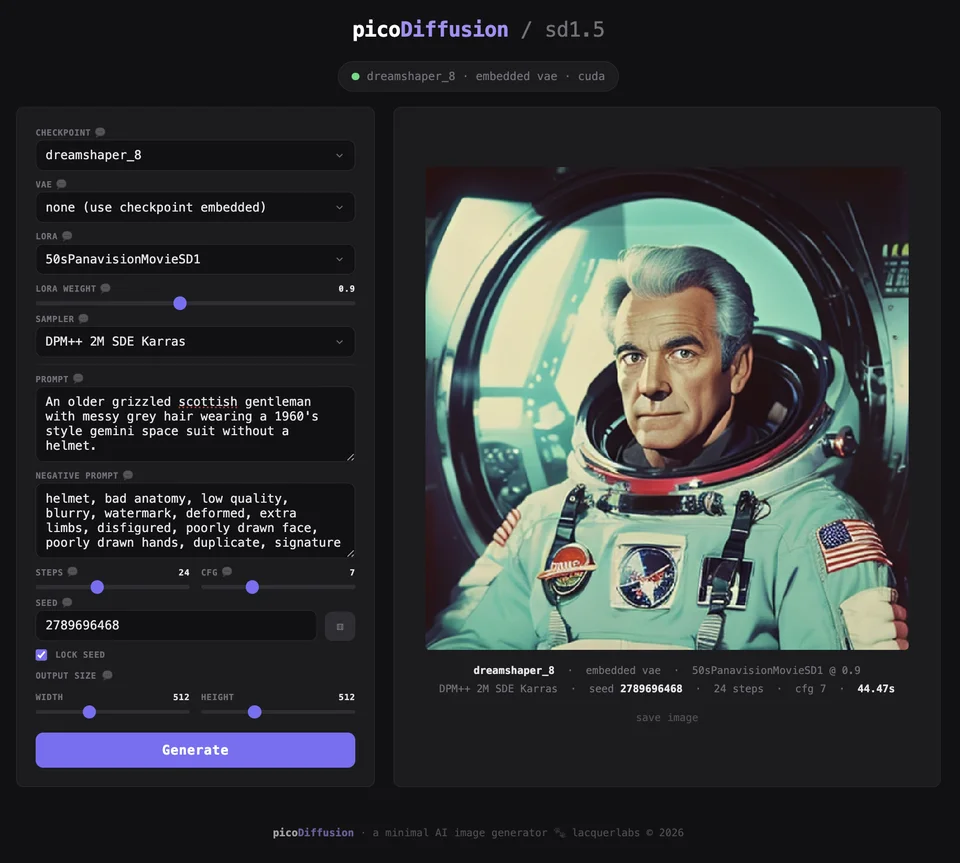
Minimal and focused
One page, one purpose. Every control has a built-in help guide that explains what it does and how to use it. No hidden menus or 47 tabs of settings.
Built for learning
Every control has a help button that explains what it does and what values to try. This is a tool for learning how image generation works, not a production pipeline.
Docker
Runs in a Docker container with NVIDIA GPU passthrough. One command to build, one command to start. Works on any Linux system with Docker.
Fast-ish on modest hardware
Generates 512x512 images in under a minute on a Quadro P2000 with 4GB VRAM. No expensive GPU required.
LoRA support
Load LoRA add-ons to change styles or add concepts. Adjustable weight slider lets you control how much influence the LoRA has.
Lazy model loading*
No model is loaded at startup. Choose your checkpoint from the UI and it loads on demand. Switch models without restarting the container.
* This card is here to balance out the other cards
Flexible output sizes
Width and height sliders from 256 to 1024 in steps of 32. Make squares, portraits, landscapes — whatever your image needs.
PNG metadata
Every generated image has its full settings embedded in the PNG file. Prompt, seed, checkpoint, LoRA, sampler — all saved so you can reproduce any image.
What you need for the best experience and results
- A Linux system with Docker installed
- An NVIDIA GPU (even an old one — we built this on a 2017 Quadro P2000 with 4GB VRAM)
- A Stable Diffusion 1.5 checkpoint file (download from civitai.com)
That is it. No Python environment to set up, no dependencies to manage, no CUDA toolkit to install. Docker handles everything.